Aim
To help you examine files of various kinds to see what is in them. This might be
•in order to see whether they’re really in plain text format
•to see whether there's something wrong with them, such as unusual characters which oughtn't to be there
•to see whether they were formatted for Windows, Mac, or for Unix
•to check out any hidden stuff in there. (A Word .doc for example will have lots of hidden stuff you don’t see on the screen but is inside the file anyway, such as the name of the author, type of printer being used, etc.)
•to find strings of words in a database, a spreadsheet or even a program file.
•to get certain selected characters picked out in an easy-to-find colour
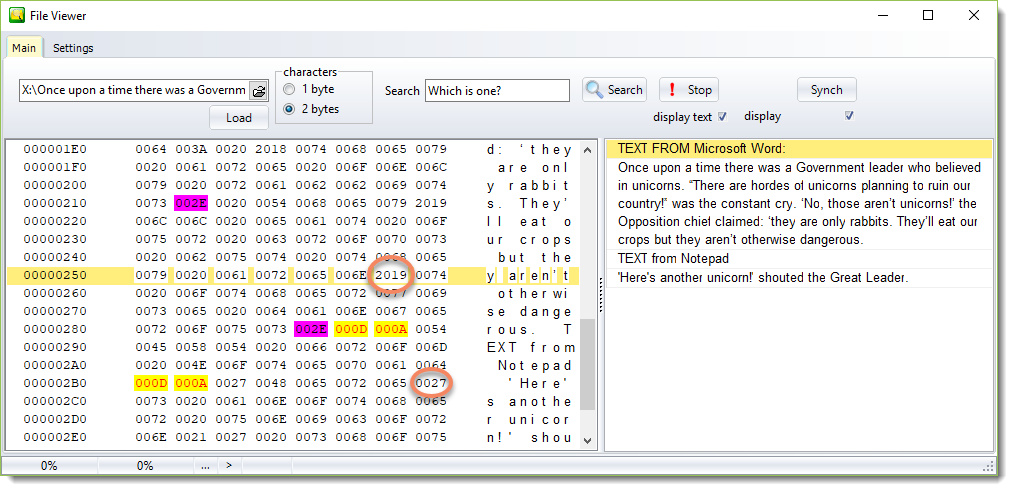
Here you can see the gory details of the text. Some characters are highlighted in different colours so you can see exactly how the text is formatted. 002E is the full stop. Character 2019 is the right-curling apostrophe in a section written using Microsoft Word. 0027 is an ordinary apostrophe used three times in the Notepad section.
Loading a text file
Choose your file – if necessary click on the button at the right of the text-input box. Press Load. Or simply drag a file from another program onto this one.
The two windows
The left window shows how the "text" is built up. You can see each character as a number and, further to the right, as a character.
The right window shows the text, paragraph by paragraph, word-wrapped so you can read it.
Searching
Just type in the search-word and press Search. The search is case sensitive.
Settings
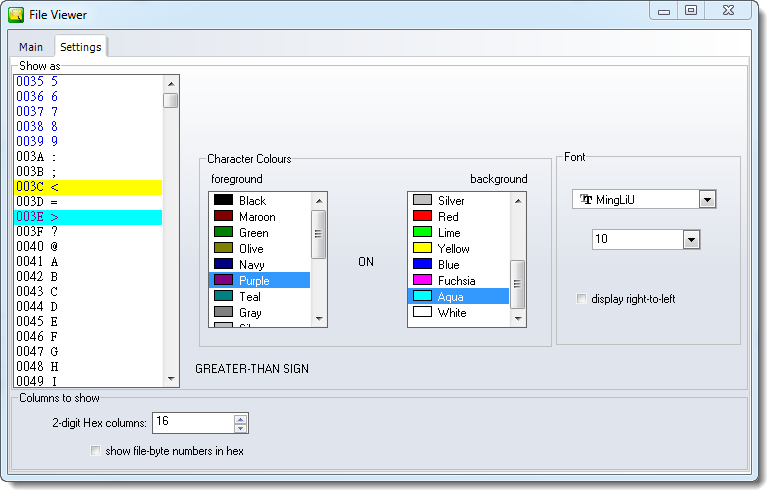
Colours
The colour grids let you see the number section in special colours, so you can find the potential problems you’re interested in.
•First select the character you want coloured.
•Click the foreground or background colour list change the colour.
The character names are Unicode names. In the picture the symbol with the 003E code (>) is the last one clicked.
Columns
oYou can set the “hex” columns between 2 and 16.
oYou can see the numbers at the left of the main window in hex or decimal.
See also: Character Profiler, characters within a word